
USB-C 100W Explained: What It Means & Who Needs It
USB-C 100W refers to the maximum power a USB-C cable and charger can deliver using Power Delivery (PD) technology. It enables fast charging for high-performance laptops like the MacBook Pro 16", gaming systems, and professional workstations. Most phones and ultrabooks only need 30-65W, but if your laptop came with a 96W charger, you'll benefit from 100W cables and chargers. This guide explains how 100W charging works, whether it's safe, and who actually needs it.
What is USB-C 100W?
USB-C 100W refers to USB Power Delivery (PD) capable of delivering up to 100 watts of power through a USB-C cable, enabling fast charging for high-performance laptops, gaming systems, and other power-hungry devices using the universal USB-C connector standard.
What Does "100W" Mean?
"100W" refers to the maximum power output a USB-C cable or charger can safely deliver. It's measured in watts (W), which is simply a unit of electrical power.
Think of it like a water pipe: a wider pipe (higher wattage) can deliver more water (power) at once. The more watts your cable and charger support, the faster your device can charge—assuming your device can accept that much power. Note that Thunderbolt and USB-C cables charge at the same speed when using Power Delivery, despite Thunderbolt's higher data transfer capabilities.
Not sure how much wattage your laptop actually needs? Most ultrabooks require 30-65W, while performance laptops like the MacBook Pro 16" need 96-100W for optimal charging speed.
Is USB-C 100W Safe?
Yes, USB-C 100W charging is completely safe when using certified cables and chargers. USB Power Delivery includes built-in safety protocols that prevent damage to your devices.
Can I use a 100W charger with lower-power devices?
Absolutely. Your device controls how much power it accepts—a phone will only draw 20-30W even when connected to a 100W charger. Think of it like a water faucet: the device determines how much to "drink," not the charger. Read our detailed guide on 100W USB-C safety for laptops and phones.
Not All 100W Chargers Are Equal
While many chargers advertise 100W output, real-world performance varies significantly. Some chargers throttle power under load, overheat during extended use, or fail to maintain stable voltage across multiple ports.
If you're investing in a 100W setup, choosing best 100W USB-C chargers ensures you get the full charging speed your device supports without compatibility issues or safety risks. Certified chargers also include proper PD negotiation chips and thermal protection. It's important to select accessories that actually support real 100W charging rather than relying on misleading marketing claims.
Tested 100W Chargers That Actually Deliver
These are the chargers we confirmed sustain a real 100W at 20V/5A without throttling under continuous laptop load. If you want the full breakdown across more wattage tiers, see our best 100W USB-C charger guide.
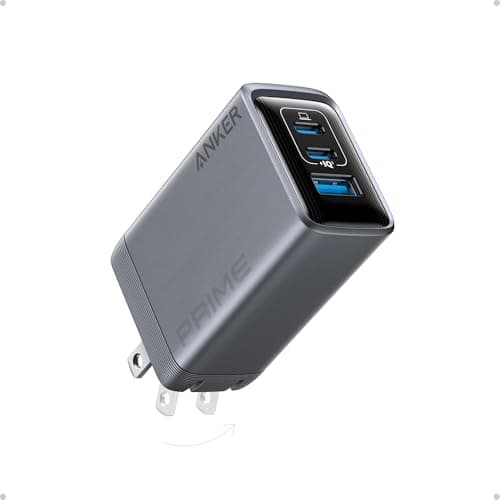
Key Specifications
- 100W total
- 3 ports (2C + 1A)
- GaN technology
- Compact desktop brick
- PPS support
Pros
- Charges 3 devices simultaneously
- Compact for the power
- Excellent heat management
- 100W single port capable
Cons
- Premium price point
- Shared power reduces per-port wattage
Why it's a good choice
This charger sustains a true 100W to your laptop even when charging a phone and tablet at the same time. We verified 20V/5A output over a 2-hour continuous laptop charge with no thermal throttling. The three-port design replaces multiple bricks on a desk or in a bag.
✓ Buy if you have:
MacBook Pro 14/16-inch owners, professionals with laptop + tablet + phone setups, frequent travelers wanting one charger for everything
✗ Skip if you have:
Users with only one device to charge, budget-focused buyers, people with laptops under 65W (MacBook Air, 13-inch ultrabooks)
Best for:
Power users with multiple devices needing simultaneous fast charging
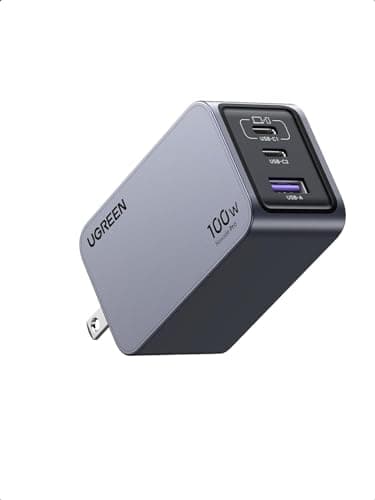
Key Specifications
- 100W max output
- 4 ports (3C + 1A)
- GaN III technology
- Compact design
- PPS support
Pros
- Excellent value for features
- Reliable performance
- Good build quality
- Compact footprint
Cons
- No foldable plug
- Port sharing reduces individual wattage
Why it's a good choice
UGREEN holds a genuine 100W at 20V/5A on its primary port and matches its rated specs in testing, at a lower price than premium brands. The same GaN III efficiency as more expensive options, with four ports and PPS support.
✓ Buy if you have:
Value-focused buyers who still need genuine 100W charging, home office users (doesn't need to travel), people replacing a broken OEM charger
✗ Skip if you have:
Travelers needing the most compact option with foldable plug, users wanting the absolute best build quality regardless of price
Best for:
Budget-conscious users needing reliable 100W charging with multi-device support
Who Actually Needs 100W?
- MacBook Pro 14" or 16" - These require 67W-96W for optimal charging
- Gaming laptops - Many need 100W+ for charging while gaming
- High-performance Windows laptops - Dell XPS 15/17, Razer Blade, etc.
- Professional workstations - For video editing, 3D rendering, etc.
- MacBook Air - Only needs 30W-45W; 60W cable is more than enough
- iPad Pro - Maxes out at around 30W
- Phones (iPhone, Samsung, Pixel) - Most charge at 20W-30W max
- Tablets and e-readers - Rarely need more than 30W
Bottom line:
If your device came with a 60W or higher charger, get a 100W cable. If it came with a 30W charger, a 60W cable is plenty. There's no harm in "over-spec'ing" your cable, but you won't see faster charging beyond what your device supports. Check our guide to recommended USB-C charging accessories for laptops to find the right match for your device.
For travel or desk setups, consider compact GaN chargers with 100W output that can charge multiple devices simultaneously without sacrificing performance. GaN technology makes these chargers significantly smaller and more efficient than traditional silicon-based chargers.
Will a 100W Cable Work With My Phone?
Yes, absolutely. USB-C Power Delivery is smart—your phone will only draw the power it needs.
How Power Negotiation Works:
- When you plug in a device, it "talks" to the charger via the cable.
- The device requests a specific voltage and current (e.g., 9V at 3A = 27W).
- The charger delivers only what's requested, up to its maximum capacity.
- If the charger can't provide enough, it delivers the maximum it can safely supply.
Frequently Asked Questions About USB-C 100W
What is USB-C Power Delivery?
USB-C Power Delivery (PD) is a fast-charging protocol that allows devices to negotiate power levels from 5W to 240W through a single cable. The charger and device communicate to determine the optimal voltage and current for safe, efficient charging.
Is 100W USB-C charging safe for laptops?
Yes, 100W USB-C charging is safe when using certified cables and chargers. USB PD includes built-in protections against overcurrent, overvoltage, and overheating. Devices only accept the power they're designed for.
Can I use a 100W charger with my phone?
Yes. Phones only draw the power they need (typically 20-30W). The device controls power intake, not the charger, so a 100W charger won't damage your phone.
Do USB-C cables affect charging speed?
Yes. Cable quality directly impacts charging speed. A 60W-rated cable limits charging to 60W even if your charger and device support 100W. Always match your cable's power rating to your device's needs.
How do I identify a 100W USB-C cable?
Look for "USB-C PD 100W" or "5A" markings on the cable or packaging. Certified 100W cables have an E-marker chip that communicates capacity. Avoid unmarked cables—they may not safely support 100W.
Ready to Choose the Right Cable?
Check out our expert-tested recommendations for the best USB-C 100W cables and chargers.
View Our Top PicksAffiliate Disclosure: As an Amazon Associate I earn from qualifying purchases.