
How Much Wattage Do You Really Need to Charge a Laptop?
Shopping for a laptop charger? Don't overspend on 100W when 65W will do—or underbuy and end up with slow charging. Here's exactly how to match wattage to your laptop and usage.
Quick Answer: What Wattage Does Your Laptop Need?
Most ultrabooks and everyday laptops charge optimally with 45-65W. High-performance laptops and MacBook Pros require 65-100W. Gaming laptops and mobile workstations demand 100W or more. Your laptop's original charger wattage is the baseline—match or exceed it for best results.
Laptop Wattage Requirements by Type
Use this table to quickly identify the minimum wattage your laptop category requires:
| Laptop Type | Typical Wattage | Examples |
|---|---|---|
Ultrabooks / Chromebooks | 30-45W | MacBook Air, Dell XPS 13, HP Spectre, most Chromebooks |
Business Laptops | 45-65W | ThinkPad X1, Surface Laptop, HP EliteBook |
Performance Laptops | 65-100W | MacBook Pro 14"/16", Dell XPS 15/17, Razer Blade 14 |
Gaming / Workstation | 100W+ | ASUS ROG, MSI gaming laptops, Dell Precision |
Pro Tip:
Check your laptop's original charger label for the exact wattage. It's usually printed as "Output: 20V ⎓ 3.25A" (which equals 65W). This is your baseline—never go lower, but going higher is safe.
What Happens With an Underpowered Charger?
Using a charger with lower wattage than your laptop needs won't damage your device, but it creates frustrating limitations:
Your laptop will take 2-3x longer to charge. A MacBook Pro that normally charges in 2 hours might take 4-5 hours with a 45W charger instead of the recommended 96W.
If you're doing intensive work (video editing, gaming, compiling code), your laptop may consume more power than the charger provides. Your battery will slowly drain even while connected.
Some laptops automatically reduce performance when connected to insufficient power to prevent battery drain. You might notice slower speeds even when plugged in.
Bottom line:
Underpowered chargers are safe but inconvenient. If you must use one temporarily (borrowed charger, travel emergency), keep your laptop in low-power mode and avoid intensive tasks.
Travel Charger vs Desk Charger: Which Wattage?
Your ideal wattage depends on where and how you'll use your charger:
Recommended: 45-65W
- Compact size - Fits easily in laptop bags
- Lightweight - Reduces travel weight
- Foldable plugs - Prevents cable snags
- Sufficient for most laptops - Charges while you work at cafes/airports
Best for: Business travelers, digital nomads, students
Recommended: 100W+
- Maximum power - Fast charging for any laptop
- Multiple ports - Charge laptop + phone + tablet simultaneously
- Future-proof - Works with any device you upgrade to
- Gaming-capable - Charges while running demanding applications
Best for: Home office, gaming setups, power users, multi-device households
Our Recommendation:
Get both if you travel frequently. A 65W GaN charger for travel (compact, powerful enough for most work) and a 100W multi-port charger for your desk (maximum speed, charge all devices). When shopping for desk setups, look for chargers that actually deliver full 100W rather than models that advertise 100W total but throttle individual ports. Total investment: around $60-80 for complete flexibility.
Recommended Chargers by Wattage Tier
Once you know which tier fits your laptop, these are the chargers we recommend. We tested each one for sustained output, heat, and real-device charging speed. Pick the tier that matches the wattage your laptop actually needs — paying for more watts than your device can draw gains you nothing.
Key Specifications
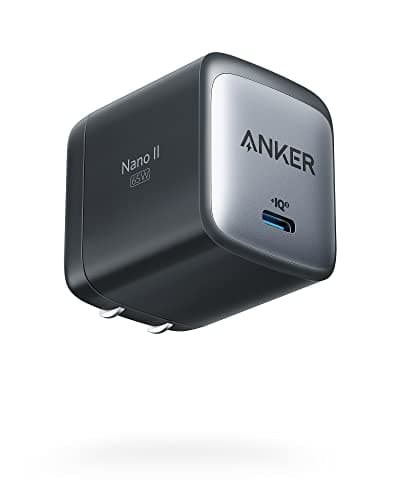
- 65W output
- Single USB-C port
- GaN technology
- Foldable plug
- Ultra-compact
Pros
- Very compact design
- Great value
- Perfect for most 13-14 inch laptops
- Foldable plug for travel
Cons
- 65W not 100W (slower for power-hungry laptops)
- Single port — no multi-device charging
Why it's a good choice
If your laptop came with a 45-65W charger, paying extra for 100W gains you nothing. This compact charger is smaller than Apple's own 67W brick, costs less, and charges just as fast for MacBook Air and 13-inch laptops. The foldable plug makes it perfect for travel.
✓ Buy if you have:
MacBook Air owners, 13-inch laptop users (ThinkPad X1 Carbon, Dell XPS 13), students on a budget, minimalist travelers
✗ Skip if you have:
MacBook Pro 14/16-inch owners, 15-inch+ laptop users, gaming laptop owners, anyone needing true 100W charging speeds
Best for:
Budget users with laptops under 65W (MacBook Air, 13-inch laptops, tablets)
Key Specifications
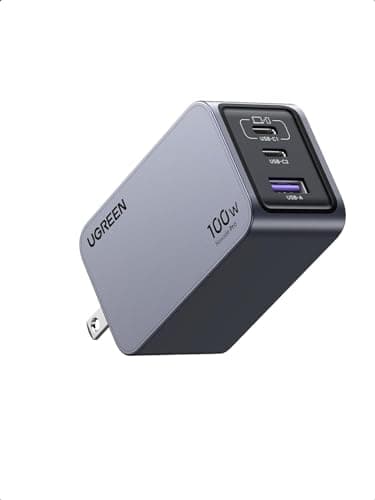
- 100W max output
- 4 ports (3C + 1A)
- GaN III technology
- Compact design
- PPS support
Pros
- Excellent value for features
- Reliable performance
- Good build quality
- Compact footprint
Cons
- No foldable plug
- Port sharing reduces individual wattage
Why it's a good choice
UGREEN delivers consistent 100W performance at a lower price than premium brands. The build quality is solid, charging speeds match the specs, and it includes the same GaN efficiency as more expensive options. You get four ports without paying the Anker premium.
✓ Buy if you have:
Value-focused buyers who still need genuine 100W charging, home office users (doesn't need to travel), people replacing a broken OEM charger
✗ Skip if you have:
Travelers needing the most compact option with foldable plug, users wanting the absolute best build quality regardless of price
Best for:
Buyers needing genuine 100W charging for a MacBook Pro 14-inch or 15-inch+ Windows laptop
Key Specifications
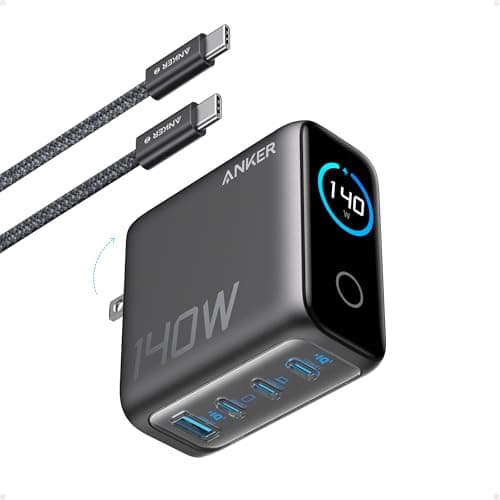
- 140W total
- 4 ports (3C + 1A)
- GaN technology
- 140W single port
- PPS support
Pros
- Charges 4 devices simultaneously
- Compact for the power
- Excellent heat management
- 140W single port — full speed for MacBook Pro 16"
Cons
- Premium price point
- Shared power reduces per-port wattage
Why it's a good choice
This charger delivers full 140W to your laptop even when charging a phone and tablet simultaneously. The four-port design means you can eliminate multiple chargers from your desk or travel bag. GaN technology keeps it compact despite the high power output.
✓ Buy if you have:
MacBook Pro 14/16-inch owners, professionals with laptop + tablet + phone setups, frequent travelers wanting one charger for everything
✗ Skip if you have:
Users with only one device to charge, budget-focused buyers, people with laptops under 65W (MacBook Air, 13-inch ultrabooks)
Best for:
Power users with multiple devices needing simultaneous fast charging at a desk
Frequently Asked Questions
Ready to Choose the Right Charger?
Browse our expert-tested recommendations for laptop chargers at every wattage level.
Affiliate Disclosure: As an Amazon Associate I earn from qualifying purchases.